Quick Answer: Best Deepslate to Stone Gradient
The most reliable deepslate to stone gradient for Minecraft builds is: stone -> andesite -> tuff -> cobblestone -> deepslate -> polished deepslate -> blackstone. Use stone and andesite where the build should feel lighter, place tuff and cobblestone as the middle transition, then reserve deepslate, polished deepslate and blackstone for the shadowed base or deepest sections.
This sequence works because it changes brightness in small steps while keeping the whole palette inside a gray, rocky material family. It is useful for castle walls, cave entrances, mountain bases, mines, underground storage rooms, fortress foundations and cliff faces. If you only need a smaller Minecraft stone gradient, cut it down to stone -> tuff -> deepslate. If the surface is large, use the full seven-step palette so the wall does not look like two separate materials pasted together.
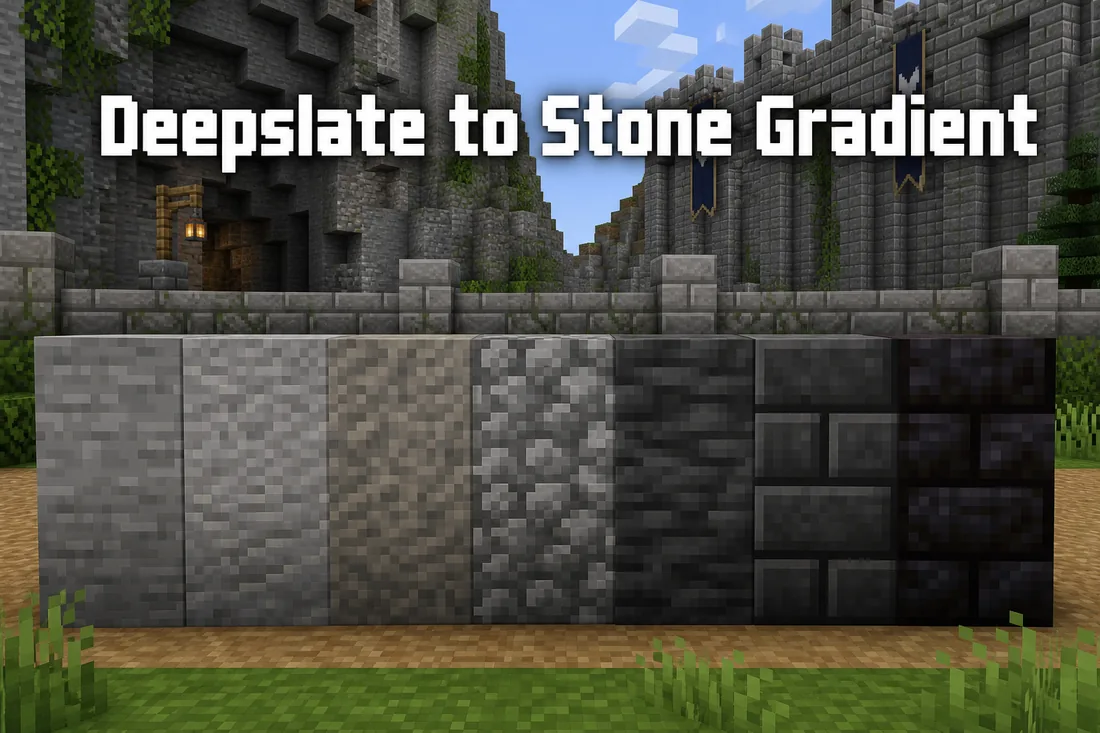
Recommended starter palette
- Stone for the lightest exposed surface.
- Andesite to soften the jump from smooth stone.
- Tuff as the neutral middle block with gentle texture.
- Cobblestone for rougher cracks and worn edges.
- Deepslate as the main dark transition block.
- Polished deepslate for structured dark wall sections.
- Blackstone only where you want the deepest shadow.
Why This Stone Gradient Works
A good Minecraft wall gradient is not only a color ramp. Blocks also need similar texture density, material logic and lighting behavior. Stone, andesite, tuff, cobblestone and deepslate all read as natural or processed rock. That shared material identity lets the gradient feel intentional instead of random.
The middle of the palette matters most. Tuff is especially useful because it sits between the cleaner light stone family and darker deepslate family. Mojang expanded the tuff block family in Minecraft Java Edition 1.21, adding variants such as polished tuff and tuff bricks, which gives builders more options for gray transitions in newer worlds.
You can check the official Minecraft Java Edition 1.21 notes for update-specific block details.
Deepslate is darker and heavier than stone, so it should usually appear near foundations, cave mouths, lower wall corners, tunnel backs or shadowed edges. If deepslate is scattered evenly across a light wall, the surface becomes noisy. If it is placed in controlled patches, it creates depth.
For a fast digital starting point, use the Minecraft Gradient Generator to explore block order, then test the result in your world. The generator helps with the sequence, but final placement still depends on scale, lighting and the shape of the build.
7 Deepslate to Stone Palettes for Minecraft Builds
Use these palettes as starting points, not strict recipes. The best Minecraft stone wall gradient changes depending on whether the wall is natural, ruined, polished, survival-friendly or part of a larger fantasy build.
| Build Use | Gradient Sequence | Best Placement |
|---|---|---|
| Castle wall | stone bricks -> stone -> andesite -> tuff bricks -> deepslate bricks -> polished deepslate | Light blocks at upper faces, deepslate bricks near the base and corners. |
| Cave entrance | stone -> cobblestone -> tuff -> deepslate -> cobbled deepslate -> blackstone | Darken inward toward the cave, with rough blocks around the mouth. |
| Mountain cliff | stone -> andesite -> gravel -> tuff -> cobblestone -> deepslate | Use irregular vertical patches rather than straight stripes. |
| Mine tunnel | stone -> andesite -> tuff -> deepslate -> cobbled deepslate | Keep light blocks near the entrance and darker blocks deeper inside. |
| Ruined wall | stone bricks -> cracked stone bricks -> cobblestone -> mossy cobblestone -> deepslate | Add moss only where water, soil or age would make sense. |
| Underground base | smooth stone -> stone -> polished tuff -> tuff bricks -> polished deepslate | Cleaner blocks work well for floors, halls and storage rooms. |
| Dark fortress | tuff bricks -> deepslate bricks -> cracked deepslate bricks -> blackstone -> polished blackstone bricks | Use this when the build is meant to feel heavy, old or hostile. |
Cobbled Deepslate Gradient Variations
Cobbled deepslate works best as a rough transition after regular deepslate, not as a direct replacement for every dark block. Use it where the wall should look broken, mined or weathered.
For a cave or mine entrance, try stone -> andesite -> tuff -> cobblestone -> deepslate -> cobbled deepslate. For a ruined base, place cobbled deepslate around cracks, lower corners and tunnel edges, then keep polished deepslate or deepslate bricks for more intentional structural parts.
How to Place a Stone Gradient Without Harsh Bands
The easiest mistake is placing each material in a clean horizontal layer. That can work for stylized pixel art, but it usually looks artificial on a Minecraft wall. For castles, caves and cliffs, start with broad zones first: light blocks high or outside, transition blocks in the middle, dark blocks low or inside.
After the zones are clear, break the edges. Put a few tuff blocks inside the stone area, a few cobblestone blocks near the deepslate edge, and a small number of deepslate blocks climbing into cracks or corners. This gives the transition a natural shape while keeping the direction readable.
For large stone walls, use a 60/30/10 rule. About 60% of the surface should be the main material, 30% should be transition blocks, and 10% should be accent or shadow blocks. On a light castle wall, stone bricks might be 60%, andesite and tuff 30%, deepslate and cracked blocks 10%. On a cave entrance, stone and tuff might be 60%, deepslate 30%, blackstone 10%.
Lighting matters. A palette that looks smooth in daylight may become too dark inside a cave or under a roof. Test a small 7-by-7 patch under the same torches, lanterns, shaders or resource pack that the final build will use. If the dark end disappears, replace blackstone with polished deepslate. If the light end looks flat, add andesite, cracked stone bricks or a small amount of gravel.
For a Minecraft stone brick wall gradient, treat stone bricks as the calm surface and use cracked stone bricks, andesite, tuff bricks and deepslate bricks only where the wall needs age or shadow. This keeps the query-specific stone brick intent on this page without turning it into a separate wall design guide.
For towers and tall retaining walls, build the gradient in vertical bays instead of one continuous stripe. Keep stone and andesite around exposed upper faces, use tuff and cobblestone through the middle 30%, then reserve deepslate and blackstone for the lowest 10% plus recessed windows, buttresses and cracks. This makes a deepslate gradient tower readable from a distance without turning every floor into a separate band.
For walls
Darken the bottom, corners, buttresses and cracks. Keep the center surface readable so the wall does not become visual static.
For caves
Make the entrance brighter and the interior darker. This gives the cave depth before the player even walks inside.
For cliffs
Use vertical patches, ledges and erosion lines. Random single blocks work less well than shaped clusters.
Survival-Friendly Deepslate to Stone Gradient
In survival mode, the best gradient is the one you can actually gather. A practical survival palette is stone -> andesite -> cobblestone -> tuff -> deepslate -> cobbled deepslate. It avoids expensive processing while still giving a clear light-to-dark transition.
If you have a stonecutter, upgrade selected parts of the build with stone bricks, polished tuff, tuff bricks, polished deepslate or deepslate bricks. Use processed blocks on visible edges, entrances, windows, arches and floors. Keep raw stone, cobblestone and tuff for larger filler areas where detail matters less.
For early-game builds, do not force blackstone unless you already have Nether access. Cobbled deepslate is dark enough for most Overworld gradients. Blackstone is better as a final accent, not a required block.
Common Stone Gradient Mistakes
Using too many high-noise blocks
Cobblestone, gravel and mossy variants all add texture. If every block is noisy, the gradient loses direction. Choose one or two rough blocks and let smoother blocks carry the main surface.
Jumping from stone straight to deepslate
Stone and deepslate can work together, but the brightness jump is strong. Andesite, tuff and cobblestone make the transition easier to read, especially on bigger walls.
Placing blackstone everywhere
Blackstone is powerful because it is dark. If it covers too much of the gradient, the wall stops feeling like a stone-to-deepslate blend and starts becoming a blackstone build. Use it at the deepest shadows, arches or lower trim.
Ignoring the build theme
A polished castle, a ruined road and a natural cave need different stone gradients. Clean builds can use stone bricks, polished tuff and polished deepslate. Natural builds usually need stone, andesite, tuff, cobblestone, gravel and raw deepslate.
Skipping tuff between stone and deepslate
Tuff, cobblestone or cobbled deepslate should sit between light stone and dark deepslate. Without a middle step, the wall often reads as two separate materials instead of one gradient.
FAQ
What is the best deepslate to stone gradient in Minecraft?
The best general sequence is stone, andesite, tuff, cobblestone, deepslate, polished deepslate and blackstone. For survival, use stone, andesite, cobblestone, tuff, deepslate and cobbled deepslate.
Is tuff good between stone and deepslate?
Yes. Tuff is one of the best middle blocks because it is darker and rougher than stone but not as heavy as deepslate. Newer Minecraft versions also include more tuff variants for detailed builds.
How many blocks should a Minecraft stone wall gradient use?
Small builds can use three to five blocks. Large walls, cliffs and cave entrances usually look better with six to eight blocks because the transition has more room to breathe.
Can I use this as a Minecraft stone gradient generator workflow?
Yes. Start with a generator to find a block order, then use this guide for placement. The sequence matters, but the final result depends on how you cluster blocks on the wall.
Should deepslate go at the top or bottom of a wall?
Most builds look better with deepslate near the bottom, corners, cracks or interior shadows. Put it at the top only if the roof, cave ceiling or surrounding terrain is intentionally darker.
Where should cobbled deepslate go in a stone gradient?
Cobbled deepslate usually works after deepslate or near rough transition zones. Use it around cave mouths, cracks, lower corners and mined edges instead of spreading it evenly across the whole wall.
Is cobbled deepslate better than regular deepslate in a stone gradient?
Cobbled deepslate is usually better as a transition because its rough texture connects cobblestone and regular deepslate. Use regular or polished deepslate when the surface should feel darker, cleaner or more structural.
How do I make a Minecraft stone brick wall gradient with deepslate?
Use stone bricks as the main face, add cracked stone bricks and andesite around worn areas, then blend tuff bricks into deepslate bricks near the base, corners or shadows. Keep blackstone as a small final accent only if the wall needs a very dark edge.
How do I build a blackstone and deepslate gradient?
Use tuff or cobblestone before deepslate, then place blackstone only in the deepest shadows, lowest corners or structural accents. A useful starting ratio is 60% stone-family blocks, 30% tuff and deepslate transitions, and no more than 10% blackstone.
Plan the Palette, Then Test It In-Game
Use this deepslate to stone gradient as a reliable starting palette, then adapt it to your biome, lighting and build scale. For fast experimentation, open the homepage tool and compare adjacent blocks before placing a full wall.
Use the Minecraft Gradient Generator