Quick Answer: Best Sand to Grass Gradient in Minecraft
The safest sand to grass gradient in Minecraft is sand -> sandstone -> gravel -> dirt -> coarse dirt -> moss block -> grass block. Use sand and sandstone where the beach or desert should stay dry, place gravel and dirt as the rough middle, then let coarse dirt, moss and grass take over near the greener biome.
This works because the palette changes both color and terrain story in small steps. Sand and sandstone feel dry and bright. Gravel breaks the hard color jump. Dirt and coarse dirt create the worn transition zone. Moss and grass finish the blend without making the edge look like a straight biome border.
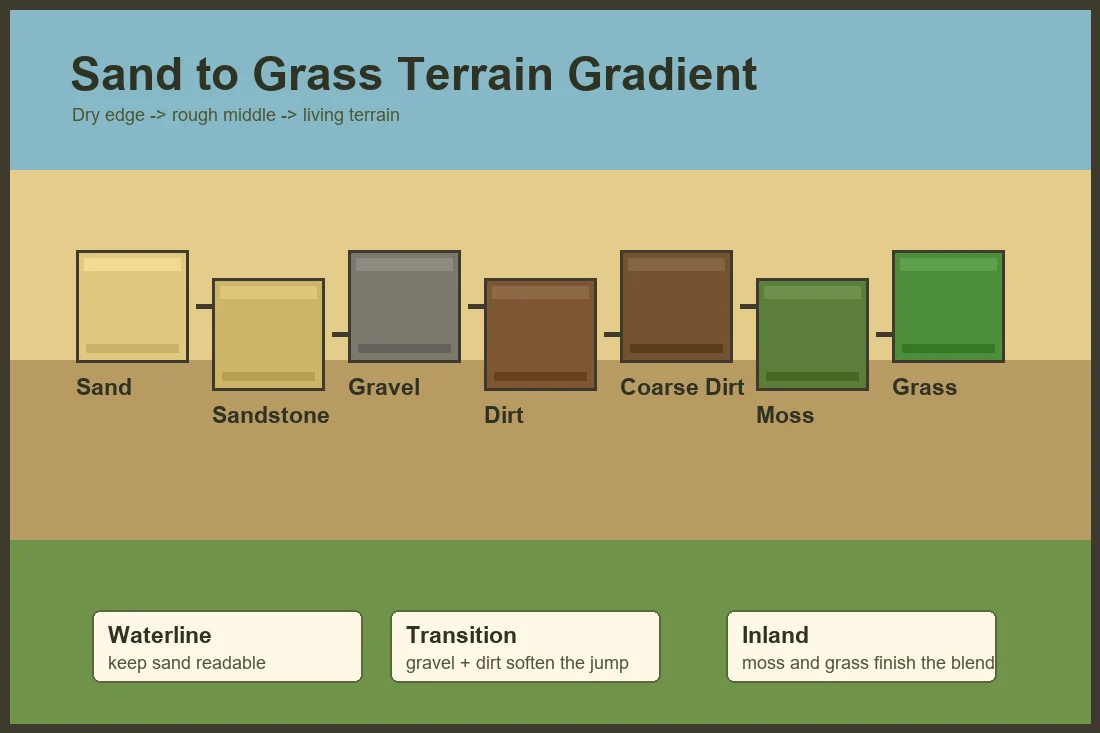
Reliable starter palette
- Sand for the dry beach or desert side.
- Sandstone where the edge needs structure or sun-baked depth.
- Gravel as the neutral rough transition.
- Dirt for the first organic middle layer.
- Coarse dirt to keep the blend worn and not too green.
- Moss block or moss carpet near damp shade and riverbanks.
- Grass block as the final living terrain edge.
Why Sand to Grass Gradients Work
A sand to grass transition is one of the easiest biome edges to make look artificial. Minecraft often places bright sand beside green grass with a hard line, and that line can distract from beaches, river mouths, desert villages, oasis builds and custom terrain.
A good Minecraft terrain gradient treats the edge as a place where material changes gradually. Dry sand becomes compacted, then mixed with gravel, then dirtier and greener as moisture and plants appear. That small story makes the build feel more intentional than a checkerboard of random blocks.
For vanilla grass behavior, biome color notes and shovel path context, check the Minecraft Wiki grass block reference while planning survival-friendly terrain edges.
The middle blocks decide whether the gradient feels natural. Gravel, dirt, coarse dirt, rooted dirt, mud and moss can all bridge the visual gap between yellow sand and green grass. Use only the blocks that match the biome, then repeat the placement logic along the shoreline instead of copying one exact patch.
If you want to compare the block order before rebuilding a shoreline, open the Minecraft Gradient Generator and test sand, gravel, dirt, moss and grass sequences before placing them in your world.
7 Sand to Grass Gradient Palettes for Minecraft Terrain
Use these Minecraft sand to grass gradient palettes as starting recipes. Adjust the exact blocks for biome color, resource pack, survival availability and whether the edge is a beach, riverbank, oasis, savanna or custom cliff.
| Terrain Style | Gradient Sequence | Best Placement |
|---|---|---|
| Simple beach edge | sand -> gravel -> dirt -> coarse dirt -> grass block | Use sand closest to water, gravel and dirt in the wet middle, grass farther inland. |
| Detailed shoreline | sand -> sandstone -> gravel -> dirt -> rooted dirt -> moss -> grass | Place sandstone under exposed ledges and moss near shade, trees or river bends. |
| Desert to plains border | sand -> sandstone -> orange terracotta -> coarse dirt -> dirt -> grass | Keep terracotta sparse so it reads as dry soil, not a separate wall stripe. |
| Savanna edge | sand -> red sand -> coarse dirt -> dirt -> grass -> acacia leaves | Use warmer blocks near dry grass and acacia details rather than cold gravel. |
| Riverbank | sand -> clay -> gravel -> mud -> rooted dirt -> grass | Put clay, mud and rooted dirt close to water where the bank should feel damp. |
| Oasis build | sand -> smooth sandstone -> dirt -> moss -> grass -> leaves | Cluster green blocks around water, palms, crops and shade instead of the whole desert. |
| Rocky beach cliff | sand -> gravel -> cobblestone -> andesite -> dirt -> grass | Use stone blocks where the beach rises into cliffs, then soften the top with dirt and grass. |
Beach, Riverbank and Desert Edge Rules
Beach gradients should usually run perpendicular to the waterline: sand at the water, gravel or dirt in the middle, and grass farther inland. If the bands run perfectly straight for too long, break them with small clusters around rocks, plants, docks or slopes.
Riverbanks can be darker than beaches because water suggests mud, clay and rooted dirt. Desert borders should stay warmer and drier, so sandstone, terracotta and coarse dirt often work better than moss-heavy transitions.
For custom biomes, pick the environmental cause first. A dry windblown edge needs sandstone and coarse dirt. A shaded river mouth needs mud, moss and rooted dirt. A rocky coast needs gravel, cobblestone and andesite before the grass begins.
How to Place the Gradient Without a Hard Border
Start by sketching the terrain shape with only sand and grass. Decide where the waterline, path, village edge, cliff base or desert border should be readable before adding transition blocks.
Use a 45/25/20/10 split for most terrain edges. About 45 percent should remain the dominant biome block, 25 percent should be the closest transition, 20 percent should be the opposite biome support block, and 10 percent should be accent blocks such as moss, clay, terracotta or cobblestone.
Follow terrain height. Low wet areas can use mud, clay, moss and rooted dirt. Raised dry areas can use sandstone, coarse dirt and gravel. This keeps the Minecraft biome transition tied to slope, moisture and player movement.
Avoid a perfect checkerboard. Natural sand to grass gradients look better as soft patches, diagonal fingers and uneven shoulders. Repeat the rule of dry-to-wet or beach-to-inland placement, not the exact same block pattern.
For beaches
Keep sand beside water, then add gravel and dirt before the grass begins.
For rivers
Use clay, mud, rooted dirt and moss where the bank should feel damp.
For deserts
Use sandstone, terracotta and coarse dirt before introducing greener blocks.
Survival-Friendly Sand to Grass Gradients
In survival mode, start with blocks you can gather in bulk: sand, sandstone, gravel, dirt, coarse dirt and grass. Moss, clay, terracotta and rooted dirt are useful accents, but the build should not depend on rare blocks unless the shoreline is small.
A cheap early-game palette is sand -> gravel -> dirt -> coarse dirt -> grass. It works for beaches, river mouths and village edges because every block is easy to collect and the color jump is gentle enough for medium-sized terrain.
Build a ten-by-ten test patch before reshaping a whole coast. View it from the ground, from a boat and from a nearby hill. If the gradient disappears from a distance, increase the patch size. If it looks noisy up close, remove one accent block.
Common Sand to Grass Gradient Mistakes
Using moss everywhere
Moss is useful near shade and water, but too much moss makes the edge feel like a swamp instead of a beach or desert border.
Skipping the middle block
Sand beside grass creates a hard color jump. Gravel, dirt, coarse dirt or sandstone should usually bridge the transition.
Making straight stripes
Straight horizontal bands can look artificial on natural terrain. Break them with diagonal patches and shape changes.
Ignoring biome color
Grass changes color by biome and resource pack. Test the palette in the actual world before copying it across a large coastline.
FAQ
What is the best sand to grass gradient in Minecraft?
A reliable starter gradient is sand, sandstone, gravel, dirt, coarse dirt, moss block and grass block. Use fewer blocks for small beaches and the full sequence for wider terrain edges.
How do I blend a beach into grass?
Keep sand closest to water, use gravel or dirt as the middle transition, then place coarse dirt, moss or grass farther inland. Avoid a perfectly straight line unless the build is intentionally formal.
What blocks work for a Minecraft biome transition?
Sand, sandstone, gravel, dirt, coarse dirt, rooted dirt, mud, clay, moss, grass, terracotta, cobblestone and andesite are useful depending on whether the edge is dry, wet, rocky or overgrown.
Is moss good for sand to grass gradients?
Moss is good near water, shade, trees and lush areas. Use it lightly on dry beaches or desert borders so the terrain does not look too wet.
Should I use the Minecraft path gradient guide instead?
Use the path guide when the surface is a road or trail. Use this sand to grass guide when the main problem is blending terrain between beach, river, desert or grassy biome blocks.
Plan the Shoreline Before Rebuilding the Whole Coast
Use these sand to grass palettes as a starting point, then compare candidate block sequences in the generator before replacing a full beach, riverbank or desert edge.
Use the Minecraft Gradient Generator