The short answer: plan the village as a connected system
Minecraft village ideas are easiest to build when you plan the settlement before placing individual houses. Choose a center, draw two or three routes from it, then assign land for homes, farms, animals, storage and decoration. This keeps the village readable from a hill and useful when you return during a survival session.
For a compact survival village, start with a footprint around 31 by 31 blocks. Leave a 9 by 9 or 11 by 11 shared center, make paths three blocks wide, and reserve one edge for crops and animals. Add houses around the routes instead of filling every empty square.
The twelve layouts are variations on that system: central square, river settlement, hillside ladder, walled hamlet, farming ring, market street and coastal dock. Shrink them by keeping the center, circulation and district roles in the same order.
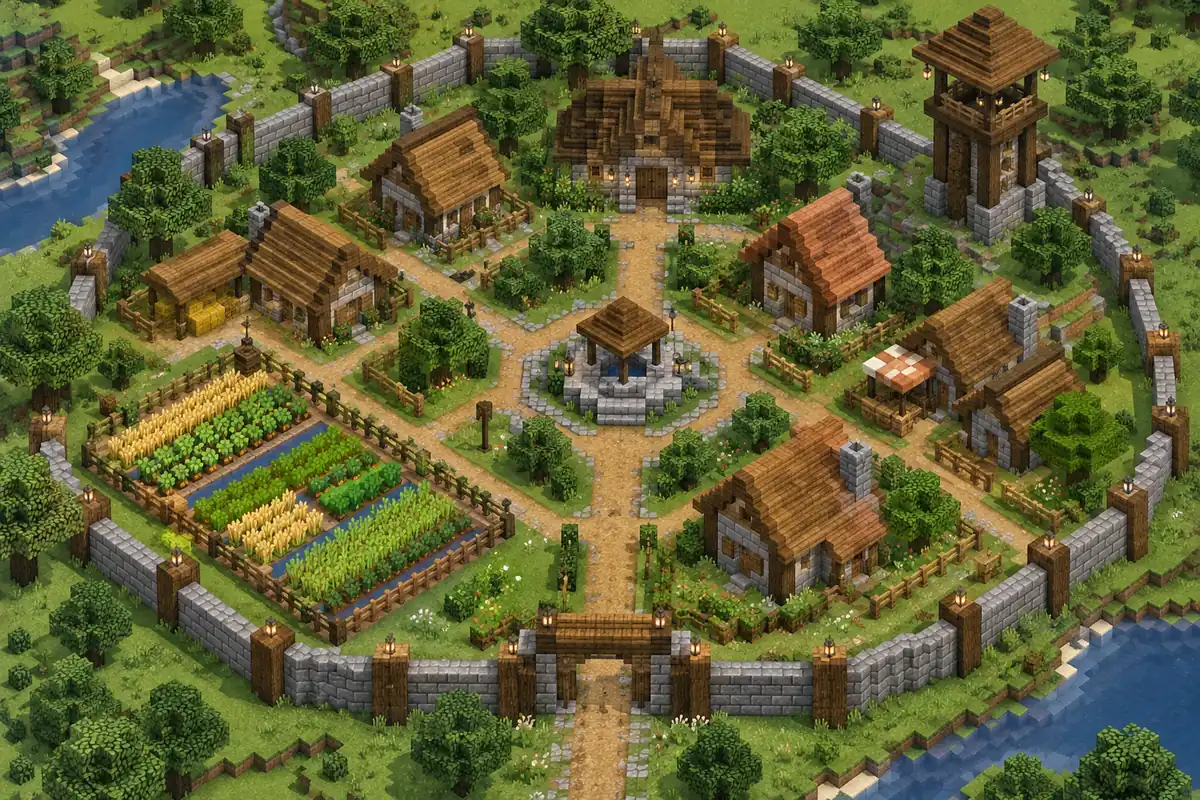
A reliable village formula
- Pick the terrain and the village job before choosing a house style.
- Place one shared center, then connect homes and work areas with readable paths.
- Keep houses on a small set of footprints so the settlement looks related.
- Use one main material family, one transition family and one accent color.
- Build lighting, water access and a safe boundary before adding tiny decoration.
What makes Minecraft village ideas feel planned
A convincing village has a visual hierarchy. The center is easiest to find, the main route is wider or brighter than side paths, and each district has a small clue that explains its purpose. A well, bell, market canopy or tree can mark the center. A row of lantern posts can pull the eye toward the farms. You do not need a grand landmark, but you do need a few repeated signals.
Scale is as important as decoration. Use two or three house footprints, vary roof direction, and leave deliberate gaps for gardens, carts, trees or future plots instead of making every building identical.
The official Minecraft village language is useful as a reference, but a custom settlement should respond to its biome. Spruce, stone and moss suit a forest; sandstone, terracotta and shade suit a desert. Keep each district consistent and transition between districts carefully.
For block behavior and official game context, check Minecraft's official game guide before committing to a palette or farm design that depends on a particular version.
Think of the village as a route map. A player should walk from gate to center, center to storage and storage to farms without crossing private yards. Clear circulation makes simple houses feel intentional.
Use elevation for landmarks: a tower, large roof or tree canopy above the center, with lower work buildings near the edge.
For a broader way to choose matching materials, start with the Minecraft color palette guide then adapt the warm, cool or neutral family to your village biome.
Minecraft village block palettes that stay readable
A village palette should make houses feel related without making every wall identical. Choose a foundation, a dominant wall or timber material, a roof family and one accent. The sequences below move from heavier or darker materials toward lighter details.
| Village style | Suggested block sequence | Best placement |
|---|---|---|
| Spruce forest | Cobblestone → stone bricks → spruce logs → spruce planks → moss | Foundations, timber frames, roofs and shaded garden edges |
| Warm plains | Stone → oak logs → oak planks → terracotta → hay | House walls, roofs, barns and crop paths |
| Riverside | Deepslate → stone → stripped spruce → mud bricks → calcite | Wet foundations, retaining walls, docks and bright trim |
| Mountain hamlet | Deepslate bricks → cobbled deepslate → tuff → spruce → snow | Lower slopes, retaining walls, homes and roof highlights |
| Desert outpost | Sandstone → smooth sandstone → cut sandstone → orange terracotta → dark oak | Courtyards, towers, shade structures and doors |
| Old walled town | Mossy cobblestone → stone bricks → cracked bricks → dark oak → lanterns | Boundary, gates, older homes and street lighting |
| Cherry hillside | Tuff → pale oak → cherry planks → calcite → pink petals | Terraces, roofs, paths and garden transitions |
Give every village district a clear job
Start with the shared center because it controls every district. A small square, bell platform, market or fountain works well. Keep it near the entrance, leave room for a route beyond it, and use it for the first lighting pass.
Put homes on quiet paths and work buildings where movement is expected. Farms need water, daylight and a route to storage. Keep animal pens outside the residential ring, while a warehouse or workshop can form a practical service edge.
Use a boundary as a design tool. A river, hedge, cliff, low wall or lantern line can define the settlement without closing every view. Leave openings for farms, docks or a future road so the village stays connected to its landscape.
12 Minecraft village layouts and placement rules
The best Minecraft village layouts are easy to extend. Mark the main route with temporary dirt or wool, walk it at night, and check that every district is reachable without cutting through a house. Replace the markers after the route works.
Use a grid on flat terrain. On hills, rivers or coastlines, let the route bend and use bridges, stairs and retaining walls to explain the level change. Repeated path widths matter more than perfectly straight streets.
These twelve layouts are starting shapes, not rigid blueprints. Combine two when a site needs capacity, and reserve an empty plot for growth.
1. Central square
Put a well, bell or tree at the center, then build four short streets and a farm edge.
2. Main street
Run a three-block-wide road from gate to market, with homes on both sides and work buildings at the far end.
3. Farming ring
Circle homes with crops, animals and storage, leaving breaks so the ring stays open.
4. River bend
Follow the water with a road and use docks or bridges as landmarks instead of forcing a square.
5. Hillside ladder
Stack short terraces with stairs, placing the center on the middle terrace and a tower above.
6. Walled hamlet
Build a low boundary around homes and keep farms just outside the gate for expansion.
7. Market crossroads
Cross two paths at a covered market, with specialty shops on the corners and homes behind.
8. Coastal dock
Set homes back from water and reserve the shore for docks, storage and a coastal path.
9. Forest clearing
Keep trees around the edge, clear building plots, and connect cabins with lanterns and gravel.
10. Mountain pass
Use a road through a safe notch, a gatehouse at the pass and homes on facing ledges.
11. Split village
Place homes on one side of a river and farms on the other, making the bridge the center.
12. Expanding frontier
Start with a camp, storage and palisade, leaving plots for an inn, stable and second street.
A survival-friendly Minecraft village build order
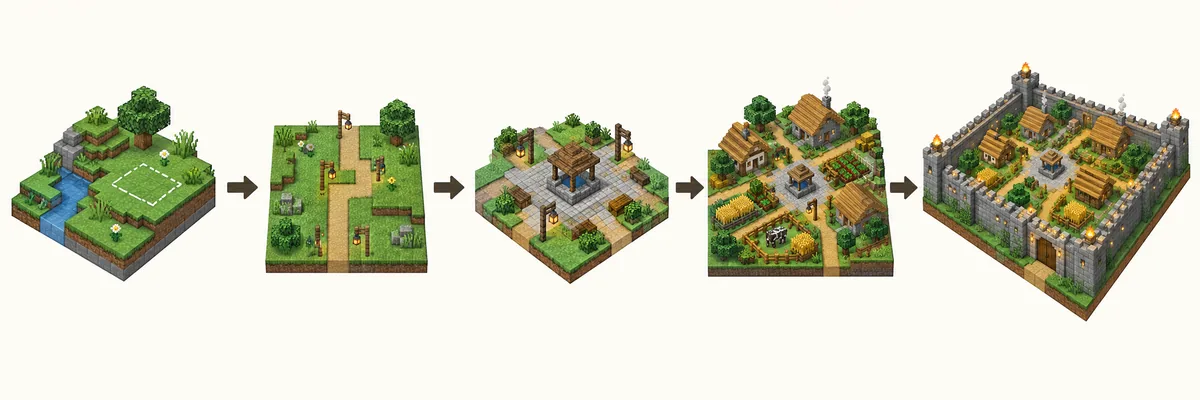
Build time-saving infrastructure before decoration. Mark the footprint, secure water, place a bed and storage, light the routes, then add the first houses and crop plot.
Use common blocks for the main field and save rare materials for focal points. Stone, cobblestone, logs, planks, dirt, gravel and glass are easy to replace; copper, calcite, moss and prismarine work better as trim or accents.
Test one house, path section and district boundary before repeating them. View the sample in daylight, rain and torchlight, then adjust roof value or path contrast before gathering more materials.
Common Minecraft village planning mistakes
Starting with houses instead of routes
Attractive houses can leave no room for farms or storage. Draw the center and main paths first, even with temporary dirt.
Making every building the same
Repeat footprints for style, but vary height, roof direction and spacing so the village does not look like a subdivision.
Using a new block family in every district
Repeat one foundation or trim block across districts so accents do not make the settlement feel assembled from separate worlds.
Ignoring the edge of the terrain
Use boundaries, docks, stairs and retaining walls to explain how the village meets cliffs, water and slopes.
Decorating before lighting
Add lanterns, torches and safe routes before leaf piles, banners and tiny stalls so the village works at night.
Minecraft Village Ideas FAQ
What is a good size for a Minecraft village?
A compact survival village can start in a 31 by 31 block area with a 9 by 9 or 11 by 11 center. Leave space beyond the first ring for farms, animals and later houses instead of filling the full footprint immediately.
How do I plan a village layout in Minecraft?
Choose the terrain, mark a shared center, draw two or three main paths, assign districts, then place a few related house footprints. Add lighting, water access and a boundary before small decoration.
How can I make Minecraft village houses look related?
Repeat a foundation, roof family, window rhythm or timber frame, then vary each footprint and orientation so the buildings feel related rather than copied.
What blocks look good for a Minecraft village?
Stone, cobblestone, stone bricks, spruce, oak, birch, mud bricks, terracotta, deepslate and moss can all work. Choose one dominant family for the biome, then use two transition materials and one restrained accent.
Should I build a wall around my Minecraft village?
A wall, hedge, river, cliff or lantern boundary can clarify the edge and improve safety. Keep it low or porous when you want the village to blend into the landscape, and leave intentional gates for farms and future roads.
How many Minecraft village ideas should I combine?
Start with one primary layout and borrow one supporting idea, such as a central square plus a farming ring. Too many unrelated shapes make routes and district boundaries harder to read.
Turn the village palette into a build plan
Use the Minecraft Gradient Generator to test a block sequence for paths, walls, houses and farms, then place a small sample before repeating it across the settlement.
Open the Gradient Generator